
When an image is sent to ImageAnywhere, the program will try to autosave the image to a patient chart based on the information the image contains. When there is an inadequate amount of patient demographic information associated with the image, ImageAnywhere will hold the image in an "Unsaved" state.
The first time a patient chart is accessed, the most recent unsaved images will be shown to the user. These images can either be saved or deleted like normal.
However, once unsaved images have been viewed in a chart once they will be moved to the "unsaved images" area and be accessible from the home screen.
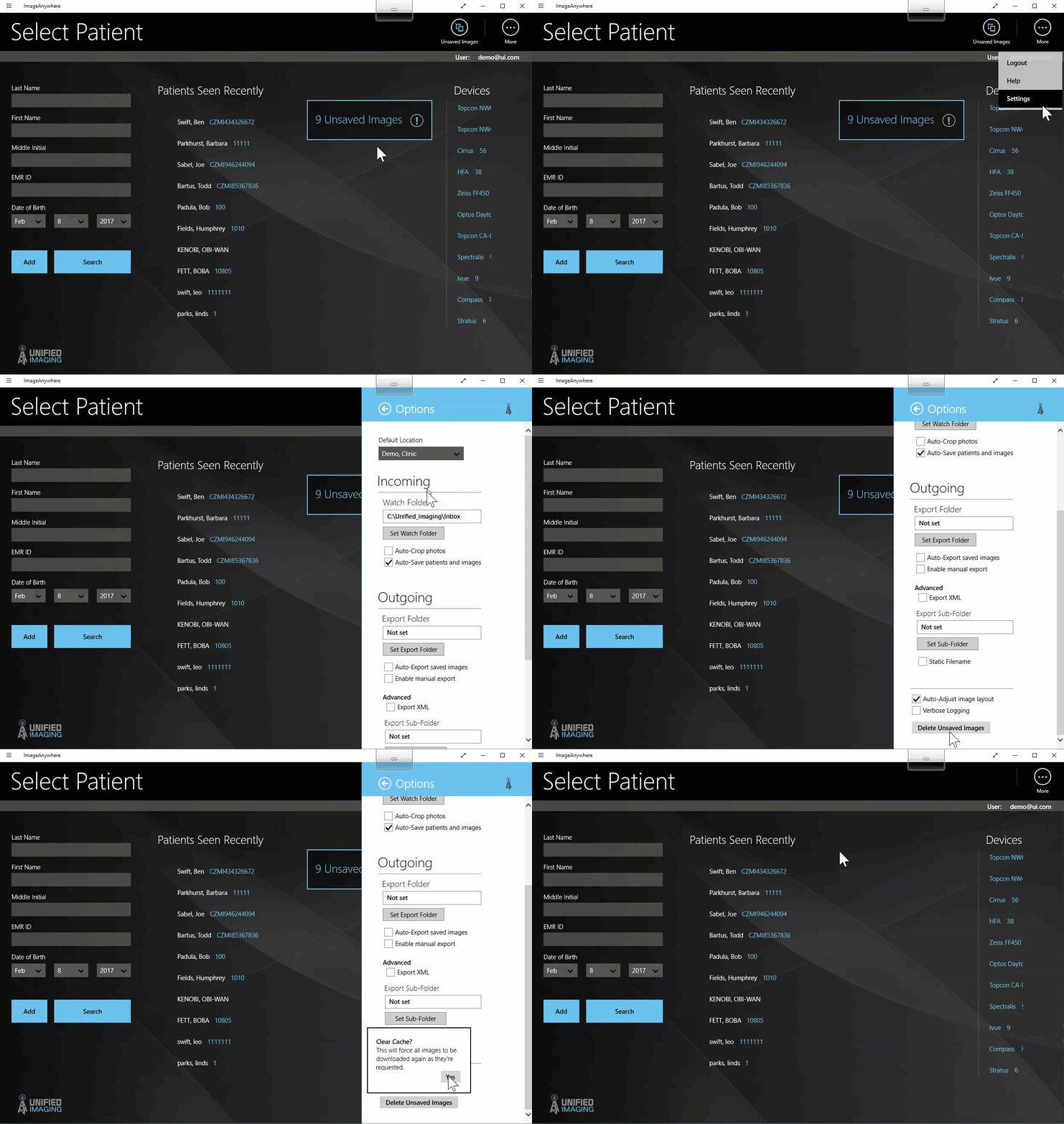
It is not always convenient to delete all of these images manually, so if all of the images in the unsaved area need to be deleted, there is a process available to users.
- From the home screen, select the "more" button in the top right corner
- Select "Settings"
- Select "options"
- Scroll down to the bottom of the options panel and select "delete unsaved images"
- NOTE: using the "delete unsaved images" button will delete any images in the system that are not associated with a patient. Only use this if all of the images in the unsaved area are not wanted.
Comments
0 comments
Article is closed for comments.